Custom Controls in IBM Cognos Analytics with AI - Part II
Part II: Inside the Hover Detail Control From Idea to Production in 16 Hours In Part One, we showed how AI collaboration made Cognos Analytics custom...
2 min read
In this post, we will explore how IBM Cognos Analytics 12.1.3, the Cognos MCP Server, and Claude Desktop can work together to extend traditional business intelligence.
Business intelligence platforms have long provided organizations with the ability to access, analyze, and report on enterprise data. With the emergence of generative AI and the Model Context Protocol (MCP), new opportunities are becoming available to interact with that information using natural language.
The objective is not to replace Cognos Analytics with generative AI. Rather, Cognos remains the enterprise BI foundation, providing governed data access, reporting, and security. MCP extends those capabilities to AI applications, while generative AI introduces new ways for users to explore, analyze, and present the information through natural language.
Recently, we completed a proof of concept integrating IBM Cognos Analytics 12.1.3 with an IBM Cognos Analytics MCP Server and Claude Desktop. Our goal was straightforward: enable an AI assistant to execute Cognos reports, retrieve the underlying results, analyze the data, and create new visualizations. The results went beyond simply running reports.
The implementation consisted of three primary components:
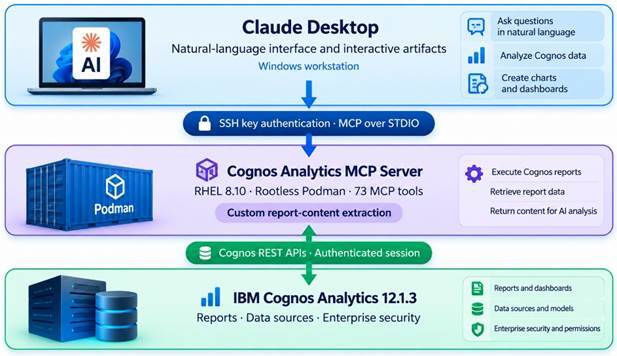
Claude Desktop connected securely to the RHEL environment using SSH key authentication. The MCP Server communicated with Cognos Analytics through its REST APIs using a dedicated Cognos service account.
This architecture allowed us to introduce AI-assisted analytics without modifying the Cognos Analytics installation itself.
After configuring authentication and connectivity, the MCP Server exposed 73 tools to Claude, providing capabilities for interacting with Cognos content, including executing reports and retrieving their outputs.
Using IBM's sample data, we successfully executed a banking risk report titled Loss by Risk Category.
However, we encountered an important limitation.
Although the MCP Server could execute the report and download its Markdown output, the download tool returned only file metadata and a saved file location. Claude could not directly analyze the contents of the report.
To address this, we extended two Python components of the MCP Server: the report-download tool and its response model. The enhancement allowed textual report output, including Markdown and CSV, to be returned directly to the AI assistant.
The modifications were packaged in a separate custom container image, preserving the original MCP Server image for rollback.
With the enhanced MCP Server in place, Claude was able to retrieve and analyze the Cognos report results.
Using natural-language instructions, Claude generated an interactive dashboard containing:
The dashboard also provided interactive visualizations and access to the supporting data through a Sources panel and downloadable CSV.
Importantly, this was a Claude-generated interactive artifact based on Cognos report output, not a dashboard created within Cognos Analytics.
This proof of concept demonstrates an emerging relationship between traditional business intelligence and generative AI.
Cognos Analytics continues to provide governed access to enterprise information and established reporting capabilities. MCP provides a standardized interface through which AI applications can interact with those capabilities.
Generative AI adds another layer: users can ask questions, explore results, identify patterns, and create analytical presentations using natural language.
There are important considerations around data security, validation of AI-generated calculations, and ensuring that generated dashboards accurately represent the underlying measures. AI-generated artifacts also represent snapshots of the retrieved data unless a refresh mechanism is implemented.
Nevertheless, the opportunity is significant.
The future of business intelligence may not be about replacing existing BI platforms with AI, but about making the information within those platforms more accessible, interactive, and actionable.
Our Cognos Analytics MCP implementation provides a practical example of how that future is beginning to take shape.