IBM Cognos Controller 10.3.1. Released
The latest version of IBM Cognos Controller is now available and features integration with IBM Planning Analytics Workspace. This provide tighter...
3 min read
We have created a Financial Reporting Agent for IBM Planning Analytics. The agent automates periodic financial reporting using data in IBM Planning Analytics and related infrastructure. It can be deployed on AWS or Azure following the Microsoft Foundry or AWS Bedrock framework, and managed via Watsonx Orchestrate.
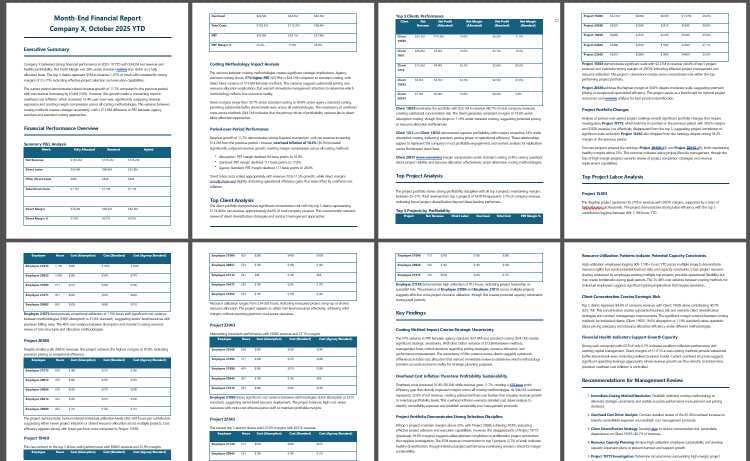
Our business objective and opportunity is to automate financial reporting. When actuals update at the end of each month, the agent generates a financial report in PDF format that outlines the financial results including drivers of performance, variances, etc.
Here is a sample report output from the agent:
The agent is unique for the following reasons:
It is customized for every individual Planning Analytics implementation
It understands the structural relationships between cubes, rules, and processes
It operates autonomously based on simple parameters (Company, Period, etc.)
It returns insight based on summarization of data, and leverages its toolset along the way to drill down into the drivers of performance
We deployed the agent on a Business Profitability Model with one of our customers. The initial setup contains specific tooling to interrogate and document the TM1 model to build up to the knowledge base layer. Once the custom knowledge base is in place, the agent can start creating reports. Information in the report includes— but is not limited to— the following:
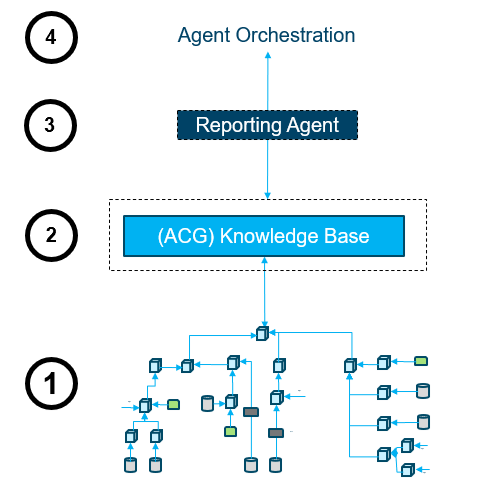
Here is a conceptual picture of the solution. The description of each layer is below.
Solution Description:
Existing Finance Infrastructure: This node represents a reasonably complex financial system that includes multiple cubes and data stores. Typically, there are rules and processes that manage the data flow in an application, and these need to be parsed so that the lineage of specific data can be understood at the top level in IBM PA. Data also enters the Planning Analytics application from a wide variety of relational and multi-dimensional data sources that must be reflected by the documentation layer. In our case, we assume that the multi-dimensional data store is IBM PA, and all our current use cases are on IBM PAoC (V11) or IBM PA SaaS (V12).
We like this approach for a number of reasons:
Low entry point for AI
It provides a low entry point option for leveraging AI and for providing immediate business benefit. The agent can be deployed in 2-3 weeks and provides real tangible results early on. Clients can then continue to explore options to expand AI use as appropriate.
Low Cost
It is a low-cost step to start the AI journey. Instead of rolling out agents to hundreds of users on Day 1 and risking data quality and performance issues, this approach offers a way to manage the cost and risk early on. The cost of the LLM in directed workflows like this is minimal, when compared to the cost of many users asking arbitrary questions in a chat interaction.
Customizable
The agent is configured on the specific client TM1 model so that it can understand the structure. The output can be customized to each client’s specific reporting requirements.
Low risk of errors and “hallucinations”
Since we are accessing a well-defined and documented model in a controlled fashion, the risk of “hallucinations” or incorrect responses remains minimal. This can be further mitigated by fine-tuning the agent's instructions and if needed, using the agent to validate responses before distributing the final report.
In case of questions, or if you would like to discuss in more detail, contact us at solutions@acgi.com.